How to improve old photos with artificial intelligence
Anúncios
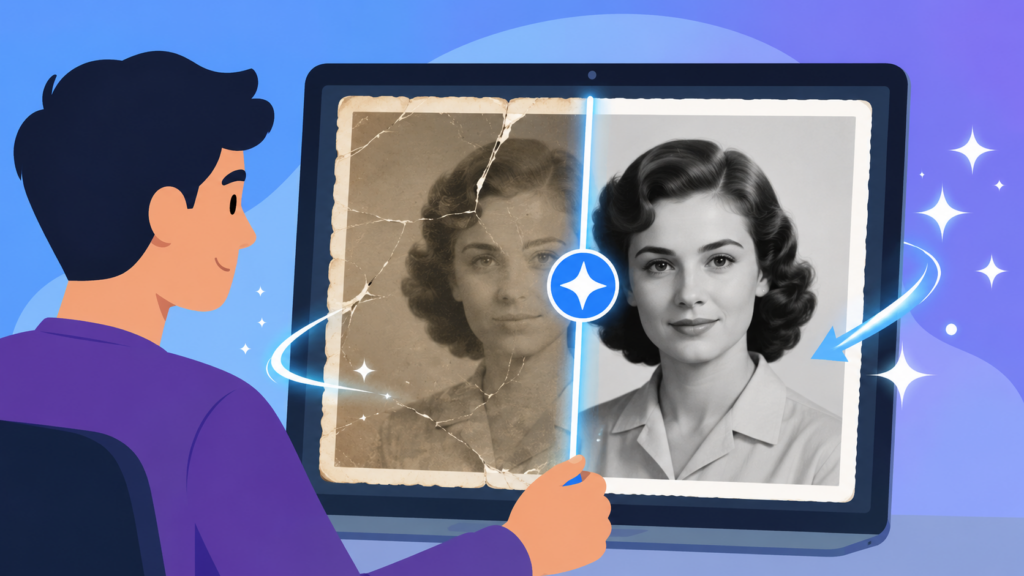
Artificial intelligence can make an old photograph look clearer in just a few steps.
The selected app has a huge presence on Android and iPhone and is focused on improving blur, faces and low resolution.
SEE THE APP TO RESTORE PHOTOSLEARN THE STEP BY STEPAVOID ARTIFICIAL CHANGESAn old photograph may lose sharpness, contrast and detail due to original quality, paper or poor digitization. Artificial intelligence does not physically repair the photo, but it can work on a digital copy and generate a sharper version, with less noise and with more visually defined faces.
The selected tool is Remini. On Google Play it exceeds 500 million downloads, accumulates approximately 5.86 million reviews and maintains a rating close to 4.1/5. In the American App Store it shows around 4.6/5 with about 350 thousand ratings. By volume and specialization, it is one of the strongest references of this type.
Anúncios
Before opening any app, digitize the photo with the best possible quality. A scanner is the most stable option. If you use your phone, place the photo flat, use even light, avoid reflections, and keep the camera parallel to the paper. AI works best when it receives a clear copy.
Always save the original file unedited. Enhancement models can reconstruct eyes, mouth, hair, and skin texture using learned patterns. When the photo has very few details, the result can appear realistic without being exactly true to the person.
The first processing should be moderate. Improve the photo and then enlarge the faces. Compare the shape of the eyes, mouth, eyebrows and contours with the original. If you change the expression too much, try another version. A familiar restore should improve readability without erasing the ability to return to the authentic document.
- Digitize with good light.
- Save an original copy.
- Apply moderate improvement first.
- Compare faces before and after.
- Don't use an AI reconstruction as exact historical evidence.
Why AI can improve a very blurry image
Models recognize patterns of faces, borders and textures. When they find a blurry area, they generate a more defined probable version. In portraits with sufficient visible structure, the result can be very convincing.
But reconstructing is not recovering lost information. If an eye occupied just a few pixels, the system cannot know for sure what it was like. Produces a plausible interpretation.
SEE THE APP TO RESTORE PHOTOSHow to get better digitization from the beginning
Clean the scanner lens or glass and avoid direct flash. If photographing the paper, place soft light from both sides and keep the camera straight to reduce warping.
Don't try to physically clean a valuable photo with water or homemade products. If the paper is damaged, work on digitization and preserve the original without aggressive interventions.
SEE THE APP TO RESTORE PHOTOSAfter processing, create a side-by-side comparison. See if the system softened the skin too much, changed teeth, or invented eyelashes. If a family member's face stops looking like the person you remember, it retains a less intense version.
Remini is free to download, but includes ads and purchases or subscriptions. Free features may change. Before paying, try several different photos and see if the type of enhancement matches what you need.
Separately saves the original scan, moderate correction, and AI version. This organization prevents someone from confusing the reconstructed image with the original document years later.
To print a restore, check the image on a large screen beforehand. Small defects may go unnoticed on the phone and become evident on paper. A small print test helps evaluate color, contrast, and sharpness.
When you share a restored version, you can indicate that it was enhanced with artificial intelligence. This note maintains transparency and prevents a reconstruction from ending up circulating as if it were the original scan.
Frequently asked questions
What app was selected?
Remini, an app with more than 500 million downloads on Google Play and an official version for iPhone.
Is free?
It is downloaded for free, with ads and purchases or subscriptions.
Can you remove blur?
You can reduce it visually and reconstruct details.
Can you change your face?
Yes. You can make up details when the original information is insufficient.
Should I save the original?
Yes always.
Is it suitable for printed photos?
Yes, after digitizing them.
The second page brings together step by step, care and recommendations.
SEE THE APP TO RESTORE PHOTOS